

Auto-plug is not an auto-reply to other people’s engagement. It’s a scheduled comment from you, on your own post. The post still goes out clean — the follow-up just shows up later.
Auto-plug is available for LinkedIn posts only. If a post goes only to Instagram, the toggle shows Coming soon on IG. If it goes to both, the comments are posted on LinkedIn only.
Turn auto-plug on
Auto-plug lives in the same Publish Post dialog as scheduling. After you click Publish in the editor, flip the Auto-plug toggle on.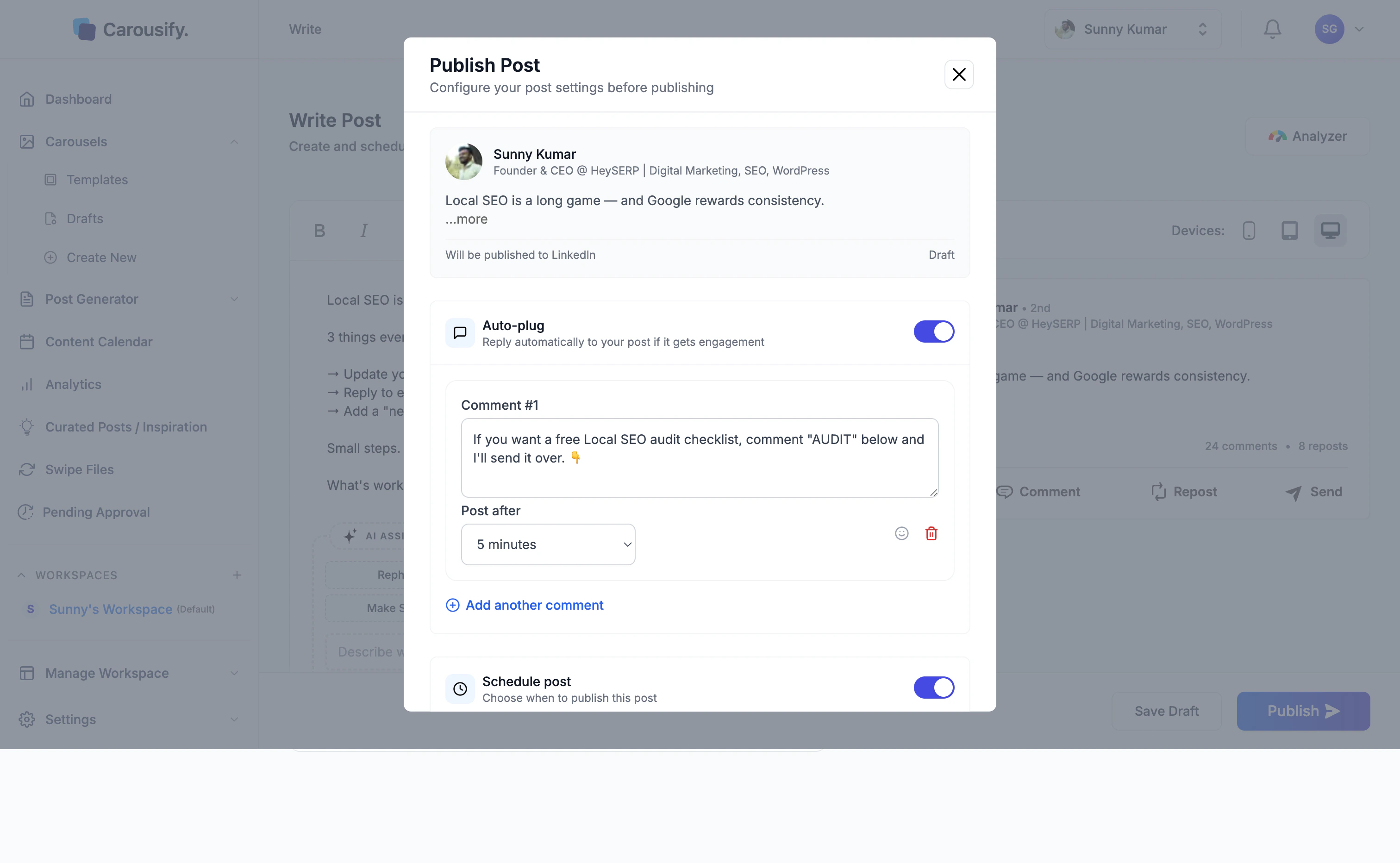
- Comment — what Carousify will post under your post
- Post after — the delay. Pick a preset (5m, 15m, 30m, 1h, 2h, or 4h) or type your own number of minutes or hours.
Write the follow-up comment
Use the comment for whatever the post itself shouldn’t carry — a link to your blog, a lead magnet, a “DM me” call to action, or a related resource:- “Free Local SEO audit checklist — comment AUDIT and I’ll send it over.”
- “Full breakdown on the blog: example.com/post”
- “Want the template? Drop a 🙋 below.”