> ## Documentation Index
> Fetch the complete documentation index at: https://docs.carousify.com/llms.txt
> Use this file to discover all available pages before exploring further.
# Webhooks
> Send Carousify post events to your own backend in real time — no polling, no Zapier middleman.
Webhooks are Carousify's developer-facing pipe for the same post events that power the Slack and Zapier integrations — **Post Scheduled**, **Post Published**, and **Post Publish Failed**. You give Carousify an HTTPS endpoint, tick the events you care about, and we POST a JSON body to that URL within seconds of the event firing.
Reach for webhooks when you're building something custom: a CRM enrichment job, an internal dashboard, a bespoke approval flow, or anything where Slack notifications and Zapier automations don't fit.
Webhooks are available on Enterprise plans. If you need the same events on a lower-tier plan, the [Slack](/integrations/slack) and [Zapier](/integrations/zapier) integrations work the same way and cover most use cases.
## When to use webhooks vs other integrations
| You want to… | Use |
| ----------------------------------------------------------------- | ------------------------------------------ |
| Get notified in a Slack channel | [Slack integration](/integrations/slack) |
| Pipe events into Google Sheets, Airtable, Teams, or 5,000+ apps | [Zapier integration](/integrations/zapier) |
| Hit your own server, run custom logic, write to your own database | **Webhooks** (this page) |
| Run Carousify actions from Claude, Codex, VS Code, or Antigravity | [MCP server](/mcp/overview) |
## Events
Carousify exposes the following events. You can subscribe one webhook to any combination of them.
| Event | Fires when |
| ----------------------- | ------------------------------------------------------------- |
| **Post Scheduled** | A post is queued for a future date and time. |
| **Post Published** | A post goes live on LinkedIn (instant or scheduled). |
| **Post Publish Failed** | LinkedIn rejected the post or auth expired before publishing. |
All events are delivered in real time — Carousify fires the request as soon as the event lands in your workspace, no batching.
## Where to find it
In the left sidebar, open **Manage Workspace › Webhooks**.
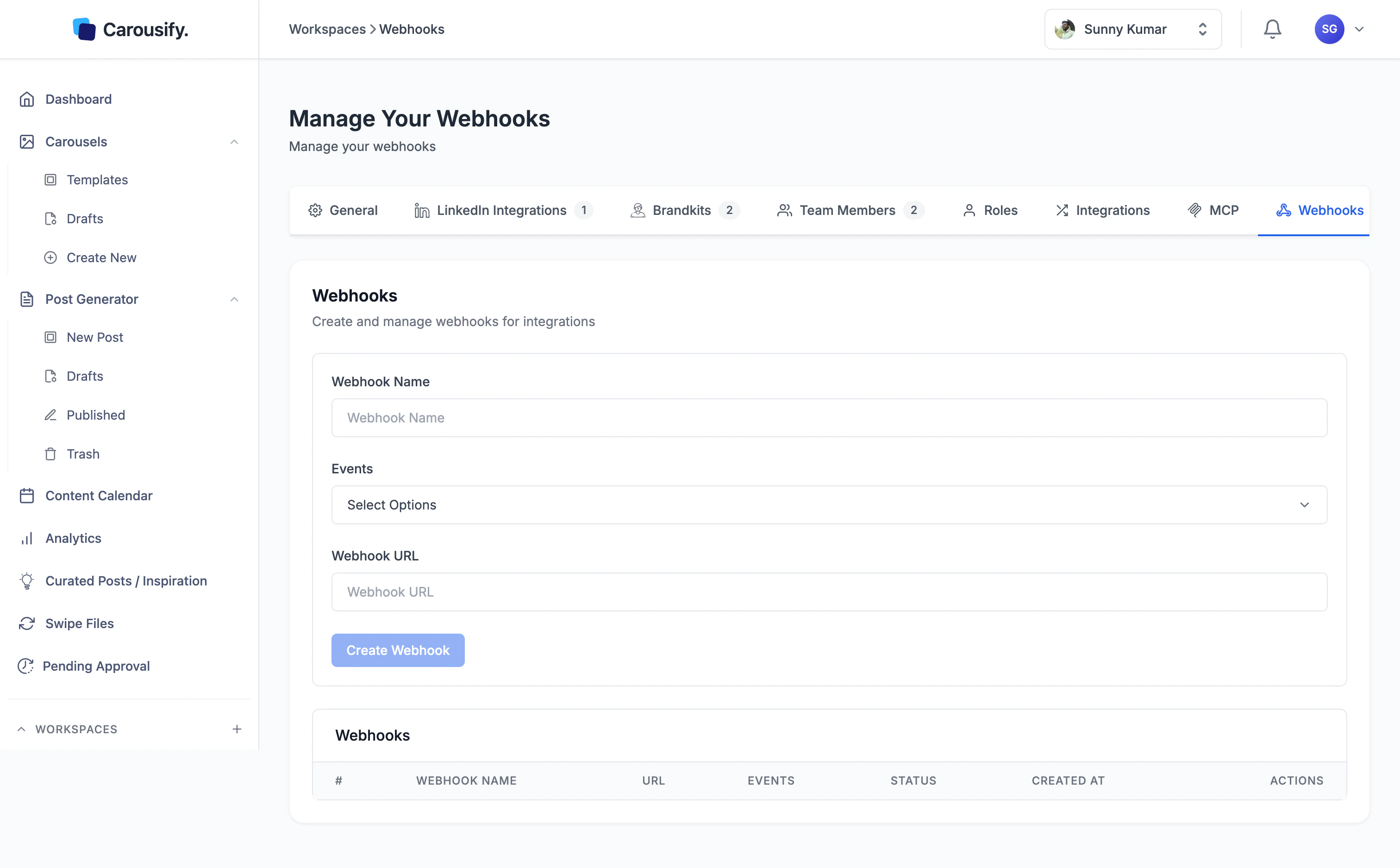 The page has two parts:
* **Create form** at the top — name, events, and URL.
* **Webhooks table** below — every webhook you've created, with its status, events, created date, and actions to edit or delete.
Webhooks are scoped to a single workspace. If you run a workspace per client, set webhooks up inside each workspace separately — they don't carry across.
## Step 1 — Stand up an endpoint
You need an HTTPS URL that accepts a `POST` request with a JSON body. It can be:
* A route in your own app (Express, FastAPI, Rails, Laravel — anything that speaks HTTP).
* A serverless function (Cloudflare Workers, AWS Lambda + API Gateway, Vercel Functions).
* A no-code receiver like [webhook.site](https://webhook.site/) for testing — generate a unique URL, paste it in, fire a test event, and inspect the body.
For the screenshots below we'll use a `webhook.site` URL while we wire things up.
Carousify only delivers to **HTTPS** URLs. Plain `http://` endpoints are rejected at save time. If you're on localhost during development, use a tunnel like ngrok or Cloudflare Tunnel.
## Step 2 — Fill in the create form
Back on the Webhooks page in Carousify:
1. **Webhook Name** — a label you'll recognize later (e.g. `CRM enrichment`, `Internal dashboard`). It's only shown inside Carousify.
2. **Events** — click the dropdown and tick any combination of **Post Scheduled**, **Post Published**, and **Post Publish Failed**.
3. **Webhook URL** — paste the HTTPS endpoint from Step 1.
The page has two parts:
* **Create form** at the top — name, events, and URL.
* **Webhooks table** below — every webhook you've created, with its status, events, created date, and actions to edit or delete.
Webhooks are scoped to a single workspace. If you run a workspace per client, set webhooks up inside each workspace separately — they don't carry across.
## Step 1 — Stand up an endpoint
You need an HTTPS URL that accepts a `POST` request with a JSON body. It can be:
* A route in your own app (Express, FastAPI, Rails, Laravel — anything that speaks HTTP).
* A serverless function (Cloudflare Workers, AWS Lambda + API Gateway, Vercel Functions).
* A no-code receiver like [webhook.site](https://webhook.site/) for testing — generate a unique URL, paste it in, fire a test event, and inspect the body.
For the screenshots below we'll use a `webhook.site` URL while we wire things up.
Carousify only delivers to **HTTPS** URLs. Plain `http://` endpoints are rejected at save time. If you're on localhost during development, use a tunnel like ngrok or Cloudflare Tunnel.
## Step 2 — Fill in the create form
Back on the Webhooks page in Carousify:
1. **Webhook Name** — a label you'll recognize later (e.g. `CRM enrichment`, `Internal dashboard`). It's only shown inside Carousify.
2. **Events** — click the dropdown and tick any combination of **Post Scheduled**, **Post Published**, and **Post Publish Failed**.
3. **Webhook URL** — paste the HTTPS endpoint from Step 1.
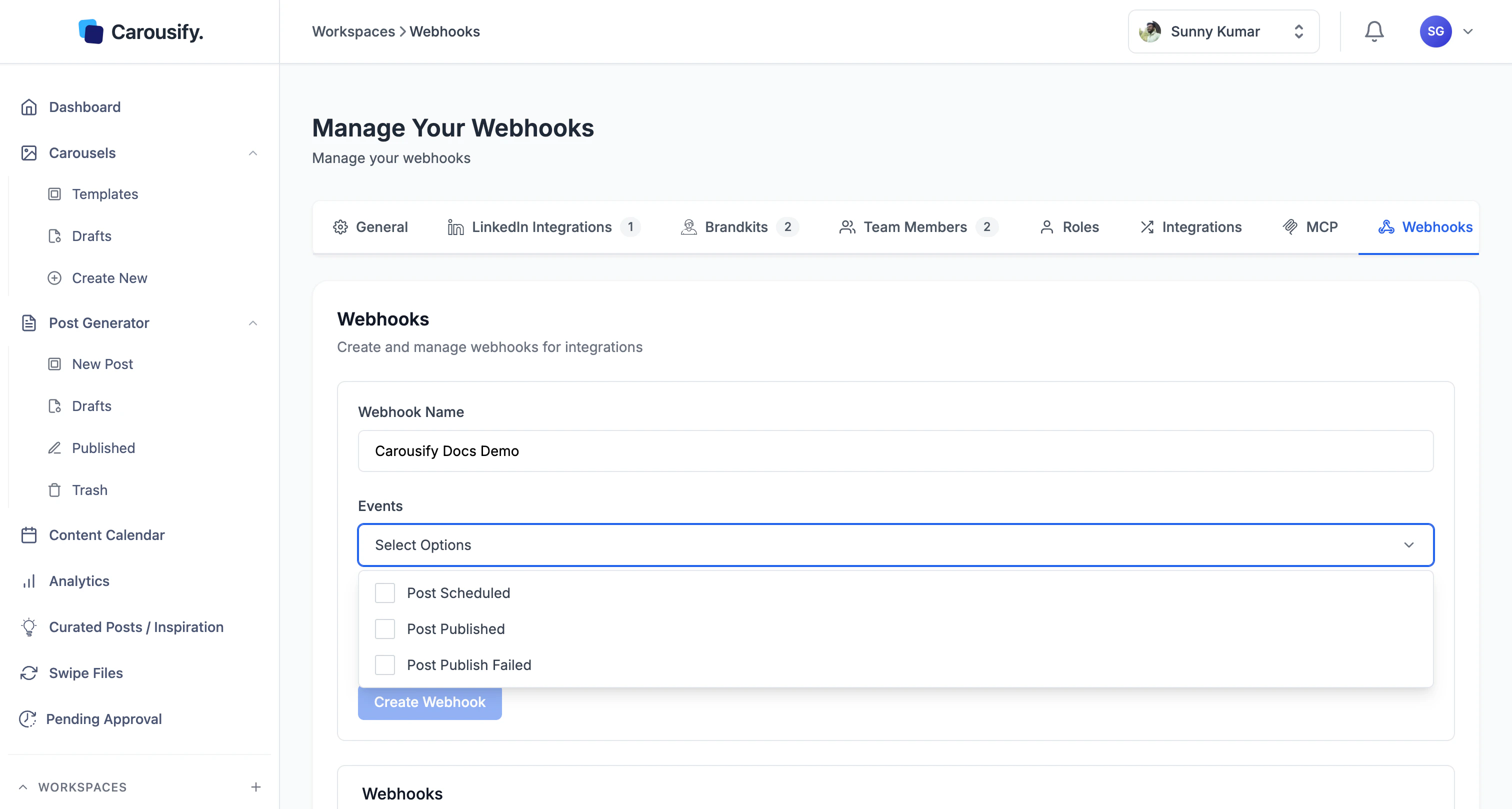 The **Create Webhook** button stays disabled until all fields are filled in and at least one event is ticked.
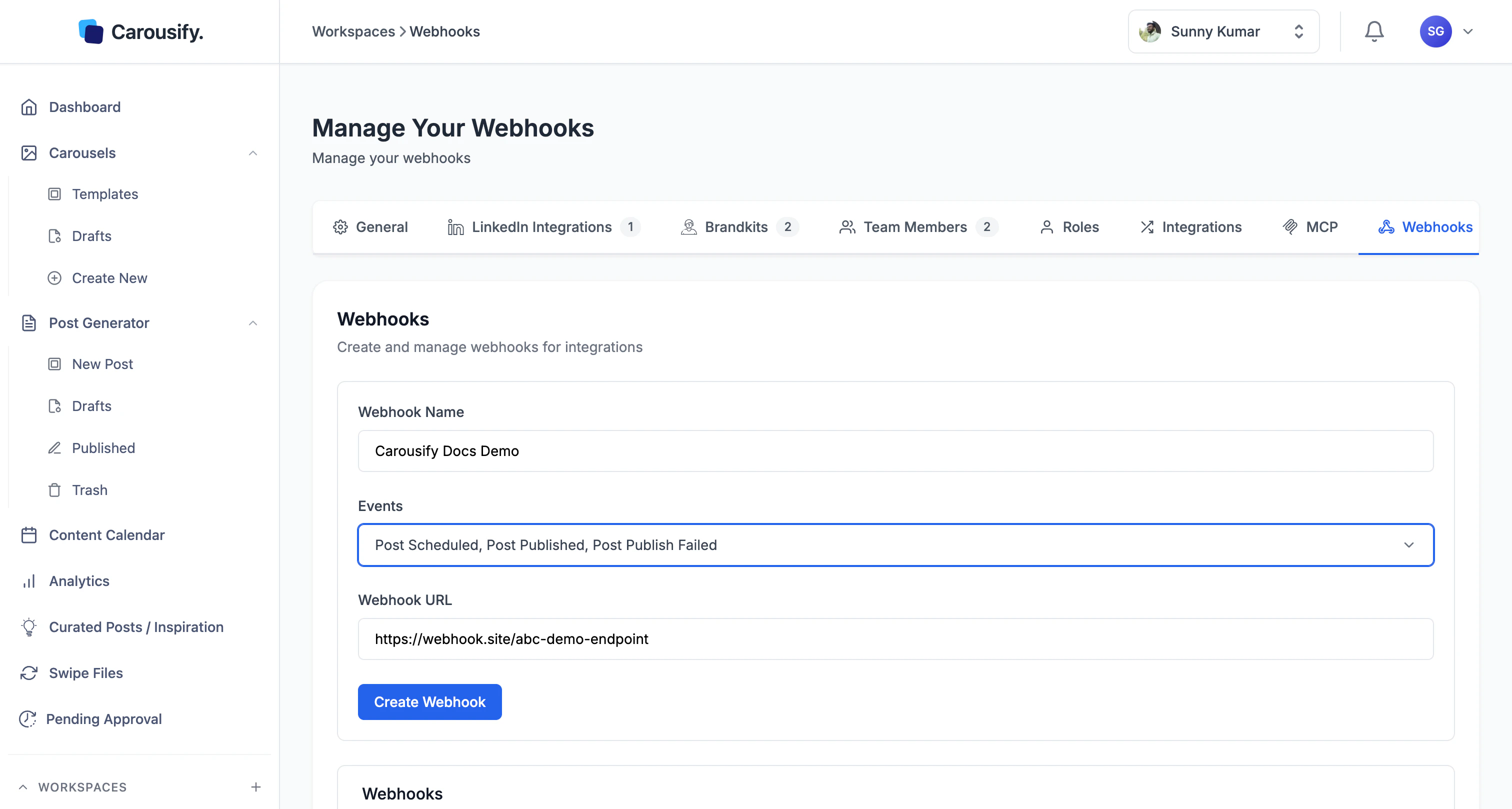 Click **Create Webhook**. Carousify validates the URL, saves the webhook, and adds a row to the table below with status **Active**.
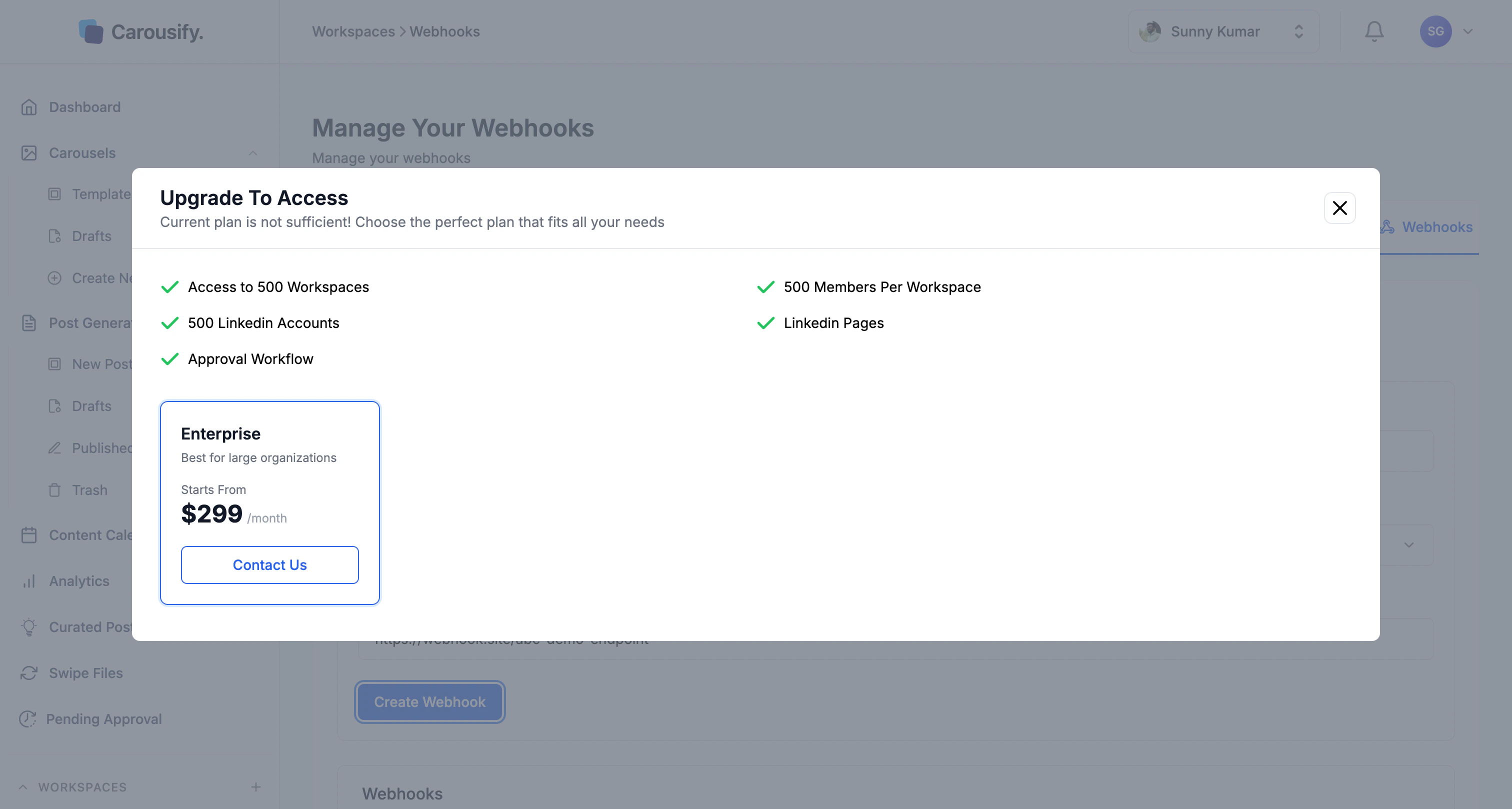
On non-Enterprise plans, **Create Webhook** opens an upgrade modal instead of saving. Reach out to [Support](https://carousify.com/contact-us/) if you'd like to talk through pricing.
Click **Create Webhook**. Carousify validates the URL, saves the webhook, and adds a row to the table below with status **Active**.
On non-Enterprise plans, **Create Webhook** opens an upgrade modal instead of saving. Reach out to [Support](https://carousify.com/contact-us/) if you'd like to talk through pricing.
 ## Step 3 — Trigger a test event
The fastest way to confirm the wiring is to schedule a real post in Carousify:
1. Open **New Post** and draft anything — even one line of text.
2. Schedule it for a minute or two from now.
3. Within seconds you'll see a **Post Scheduled** request hit your endpoint. When the scheduled time arrives, you'll see **Post Published** (or **Post Publish Failed** if LinkedIn rejected it).
If nothing arrives, jump to [Troubleshooting](#troubleshooting) below.
## Request shape
Carousify sends a `POST` request with `Content-Type: application/json`. Every event delivers the same envelope, so you can write one handler and switch on `event`:
```json theme={null}
{
"event": "post.published",
"timestamp": 1715072400000,
"data": {
"id": "65f8b2a14d9c3e0011223344",
"workspaceId": "65a1f0c8d9b34e0099887766",
"userId": "6593a4b8e1f234001a2b3c4d",
"accountType": "profile",
"accountId": "ACoAAB12Cd3EfGh4IjKlMn5OpQrStUvWxYz6789",
"content": "We just shipped link tracking for every published post...",
"title": "",
"media": [
"https://cdn.carousify.com/uploads/abc.png"
],
"status": "published",
"postUrn": "urn:li:share:7196543210987654321",
"utmCampaign": "",
"postingTime": "2026-05-07T10:30:00.000Z",
"createdAt": "2026-05-07T09:55:12.000Z",
"updatedAt": "2026-05-07T10:30:04.000Z"
}
}
```
### Field reference
| Field | Type | Notes |
| ------------------ | --------- | ---------------------------------------------------------------------------------------- |
| `event` | string | `post.scheduled`, `post.published`, or `post.failed`. |
| `timestamp` | number | Unix milliseconds — when the event fired. |
| `data.id` | string | Internal Carousify post ID. |
| `data.workspaceId` | string | Workspace the post belongs to. |
| `data.userId` | string | Carousify user who created the post. |
| `data.accountType` | string | `profile` or `pages`. |
| `data.accountId` | string | LinkedIn member or organization identifier (e.g. `ACoAAB12Cd3...`), not the vanity name. |
| `data.content` | string | Post body text. |
| `data.title` | string | Post title if set, often empty. |
| `data.media` | string\[] | URLs of images or videos attached to the post. |
| `data.status` | string | `scheduled`, `published`, or `failed`. |
| `data.postUrn` | string | LinkedIn URN — only present once a post is live. |
| `data.utmCampaign` | string | UTM campaign value if link tracking was on. |
| `data.postingTime` | ISO 8601 | When the post is/was scheduled to publish. |
| `data.createdAt` | ISO 8601 | When the post record was created in Carousify. |
| `data.updatedAt` | ISO 8601 | Last modification timestamp. |
The shape matches the [Zapier trigger payload](/integrations/zapier#trigger-payload) one-to-one, so handlers you've written for Zapier work without changes.
## Responding to a delivery
A few things to keep in mind when writing your handler:
* **Reply with `2xx` quickly.** Acknowledge the webhook first, then queue any heavy work (CRM lookups, AI calls, database writes) to run asynchronously. Holding the request open while you do that work makes deliveries slow and risks timeouts.
* **Make handlers idempotent.** Use `data.id` plus `event` as a dedupe key — if the same `(id, event)` pair shows up twice, treat the second as a no-op. Retries on transient failures are normal across any webhook system.
* **Don't trust the source IP.** Pin authenticity to a shared secret in the URL instead — e.g. `https://yourapp.com/hooks/carousify?token=...` — and reject requests where the token doesn't match.
## Managing existing webhooks
The table below the form lists every webhook in this workspace with its name, URL, subscribed events, status, and created date. Use the **Actions** column to edit or delete a webhook. Deleting it stops deliveries immediately.
## Troubleshooting
* **No requests arriving at my endpoint.** Confirm the URL in Carousify ends in `https://`, the endpoint is publicly reachable (curl it from a laptop, not localhost), and the webhook status is **Active**. Schedule or publish a post to fire a fresh event.
* **Endpoint returns 200 but I don't see the data.** You're likely reading the wrong field. Carousify always wraps the post under `data` — log the full body before parsing.
* **Endpoint times out, then receives duplicate deliveries.** Expected — those are retries. Make your handler idempotent (see above) and shorten its response time by deferring work to a queue.
* **"Create Webhook" opens an upgrade modal.** Webhooks aren't included on your current plan. Use the Slack or Zapier integrations in the meantime — both cover the same events.
* **Receiving events for posts I don't expect.** Webhooks are workspace-scoped. If you're managing multiple clients via separate workspaces, each one needs its own webhook configured.
## What's next
Same events delivered through Zapier — no code, 5,000+ destinations.
Pipe events into a Slack channel without standing up an endpoint.
Drive Carousify from Claude or VS Code — built on the same API.
Trigger your first **Post Scheduled** event and confirm delivery.
## Step 3 — Trigger a test event
The fastest way to confirm the wiring is to schedule a real post in Carousify:
1. Open **New Post** and draft anything — even one line of text.
2. Schedule it for a minute or two from now.
3. Within seconds you'll see a **Post Scheduled** request hit your endpoint. When the scheduled time arrives, you'll see **Post Published** (or **Post Publish Failed** if LinkedIn rejected it).
If nothing arrives, jump to [Troubleshooting](#troubleshooting) below.
## Request shape
Carousify sends a `POST` request with `Content-Type: application/json`. Every event delivers the same envelope, so you can write one handler and switch on `event`:
```json theme={null}
{
"event": "post.published",
"timestamp": 1715072400000,
"data": {
"id": "65f8b2a14d9c3e0011223344",
"workspaceId": "65a1f0c8d9b34e0099887766",
"userId": "6593a4b8e1f234001a2b3c4d",
"accountType": "profile",
"accountId": "ACoAAB12Cd3EfGh4IjKlMn5OpQrStUvWxYz6789",
"content": "We just shipped link tracking for every published post...",
"title": "",
"media": [
"https://cdn.carousify.com/uploads/abc.png"
],
"status": "published",
"postUrn": "urn:li:share:7196543210987654321",
"utmCampaign": "",
"postingTime": "2026-05-07T10:30:00.000Z",
"createdAt": "2026-05-07T09:55:12.000Z",
"updatedAt": "2026-05-07T10:30:04.000Z"
}
}
```
### Field reference
| Field | Type | Notes |
| ------------------ | --------- | ---------------------------------------------------------------------------------------- |
| `event` | string | `post.scheduled`, `post.published`, or `post.failed`. |
| `timestamp` | number | Unix milliseconds — when the event fired. |
| `data.id` | string | Internal Carousify post ID. |
| `data.workspaceId` | string | Workspace the post belongs to. |
| `data.userId` | string | Carousify user who created the post. |
| `data.accountType` | string | `profile` or `pages`. |
| `data.accountId` | string | LinkedIn member or organization identifier (e.g. `ACoAAB12Cd3...`), not the vanity name. |
| `data.content` | string | Post body text. |
| `data.title` | string | Post title if set, often empty. |
| `data.media` | string\[] | URLs of images or videos attached to the post. |
| `data.status` | string | `scheduled`, `published`, or `failed`. |
| `data.postUrn` | string | LinkedIn URN — only present once a post is live. |
| `data.utmCampaign` | string | UTM campaign value if link tracking was on. |
| `data.postingTime` | ISO 8601 | When the post is/was scheduled to publish. |
| `data.createdAt` | ISO 8601 | When the post record was created in Carousify. |
| `data.updatedAt` | ISO 8601 | Last modification timestamp. |
The shape matches the [Zapier trigger payload](/integrations/zapier#trigger-payload) one-to-one, so handlers you've written for Zapier work without changes.
## Responding to a delivery
A few things to keep in mind when writing your handler:
* **Reply with `2xx` quickly.** Acknowledge the webhook first, then queue any heavy work (CRM lookups, AI calls, database writes) to run asynchronously. Holding the request open while you do that work makes deliveries slow and risks timeouts.
* **Make handlers idempotent.** Use `data.id` plus `event` as a dedupe key — if the same `(id, event)` pair shows up twice, treat the second as a no-op. Retries on transient failures are normal across any webhook system.
* **Don't trust the source IP.** Pin authenticity to a shared secret in the URL instead — e.g. `https://yourapp.com/hooks/carousify?token=...` — and reject requests where the token doesn't match.
## Managing existing webhooks
The table below the form lists every webhook in this workspace with its name, URL, subscribed events, status, and created date. Use the **Actions** column to edit or delete a webhook. Deleting it stops deliveries immediately.
## Troubleshooting
* **No requests arriving at my endpoint.** Confirm the URL in Carousify ends in `https://`, the endpoint is publicly reachable (curl it from a laptop, not localhost), and the webhook status is **Active**. Schedule or publish a post to fire a fresh event.
* **Endpoint returns 200 but I don't see the data.** You're likely reading the wrong field. Carousify always wraps the post under `data` — log the full body before parsing.
* **Endpoint times out, then receives duplicate deliveries.** Expected — those are retries. Make your handler idempotent (see above) and shorten its response time by deferring work to a queue.
* **"Create Webhook" opens an upgrade modal.** Webhooks aren't included on your current plan. Use the Slack or Zapier integrations in the meantime — both cover the same events.
* **Receiving events for posts I don't expect.** Webhooks are workspace-scoped. If you're managing multiple clients via separate workspaces, each one needs its own webhook configured.
## What's next
Same events delivered through Zapier — no code, 5,000+ destinations.
Pipe events into a Slack channel without standing up an endpoint.
Drive Carousify from Claude or VS Code — built on the same API.
Trigger your first **Post Scheduled** event and confirm delivery.