> ## Documentation Index
> Fetch the complete documentation index at: https://docs.carousify.com/llms.txt
> Use this file to discover all available pages before exploring further.
# Auto-plug
> Drop a follow-up comment on your own post automatically after a set delay.
Auto-plug lets you queue one or more **follow-up comments** that Carousify drops on your own post a set number of minutes or hours after it goes live. The first hour of a LinkedIn post is critical for reach, and a self-comment with a link, lead magnet, or hook keeps the conversation going without you needing to be online when the post publishes.
Auto-plug is **not** an auto-reply to other people's engagement. It's a scheduled comment from you, on your own post. The post still goes out clean — the follow-up just shows up later.
## Turn auto-plug on
Auto-plug lives in the same **Publish Post** dialog as scheduling. After you click **Publish** in the editor, flip the **Auto-plug** toggle on.
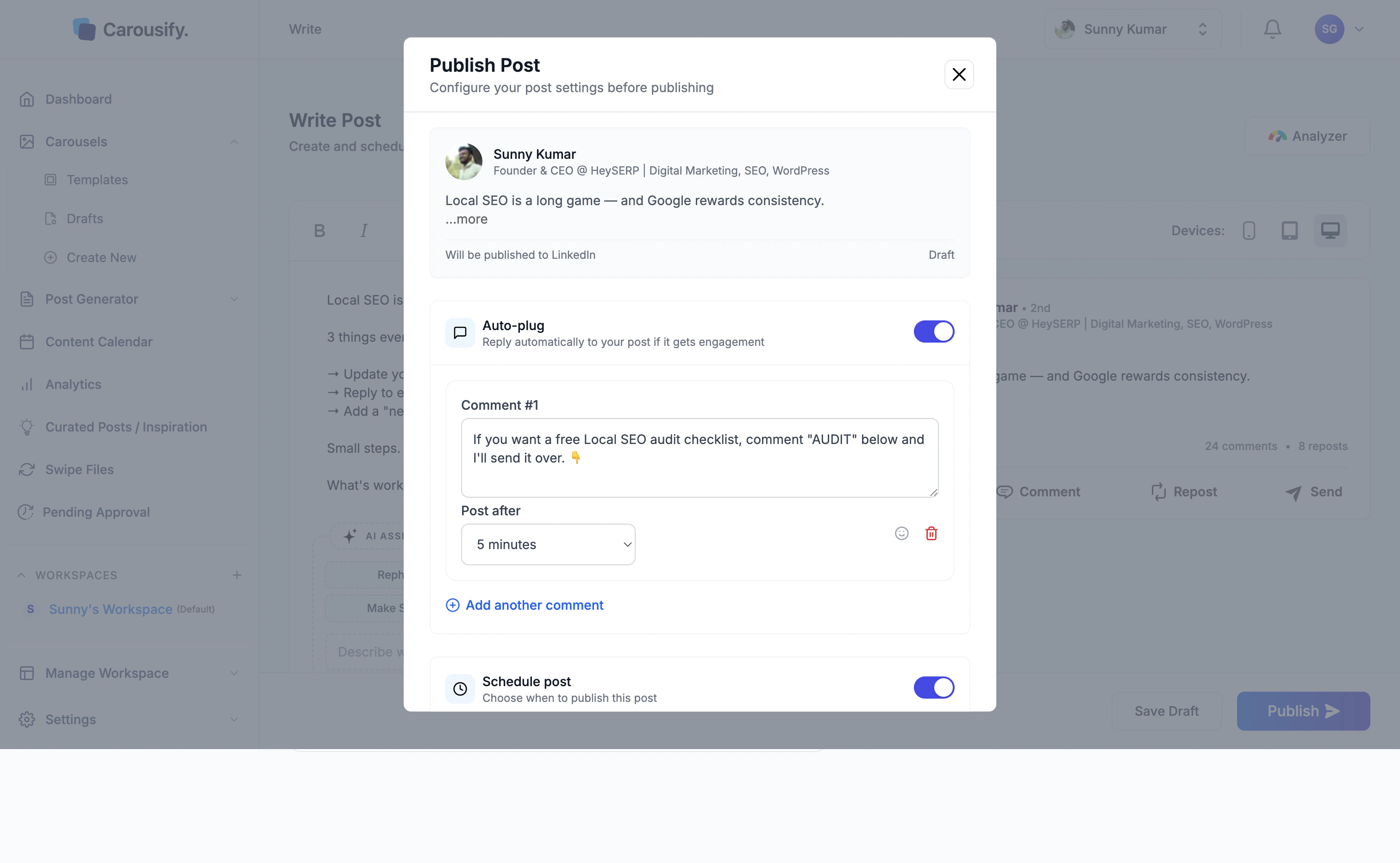 You'll see two fields:
* **Comment** — what Carousify will post under your post
* **Post after** — the delay (5 minutes, 15 minutes, 30 minutes, 1 hour, 3 hours, or 6 hours)
## Write the follow-up comment
Use the comment for whatever the post itself shouldn't carry — a link to your blog, a lead magnet, a "DM me" call to action, or a related resource:
* *"Free Local SEO audit checklist — comment AUDIT and I'll send it over."*
* *"Full breakdown on the blog: example.com/post"*
* *"Want the template? Drop a 🙋 below."*
Click **Add another comment** if you want to chain a second self-comment after a longer delay.
## Combine with scheduling
Auto-plug works whether you publish immediately or [schedule](/scheduling/schedule-post). The delay always counts from the moment the post actually goes live, not from when you set it up.
You'll see two fields:
* **Comment** — what Carousify will post under your post
* **Post after** — the delay (5 minutes, 15 minutes, 30 minutes, 1 hour, 3 hours, or 6 hours)
## Write the follow-up comment
Use the comment for whatever the post itself shouldn't carry — a link to your blog, a lead magnet, a "DM me" call to action, or a related resource:
* *"Free Local SEO audit checklist — comment AUDIT and I'll send it over."*
* *"Full breakdown on the blog: example.com/post"*
* *"Want the template? Drop a 🙋 below."*
Click **Add another comment** if you want to chain a second self-comment after a longer delay.
## Combine with scheduling
Auto-plug works whether you publish immediately or [schedule](/scheduling/schedule-post). The delay always counts from the moment the post actually goes live, not from when you set it up.