> ## Documentation Index
> Fetch the complete documentation index at: https://docs.carousify.com/llms.txt
> Use this file to discover all available pages before exploring further.
# Post Generator overview
> Write LinkedIn text posts from scratch or generate them from audio, articles, YouTube, and PDFs — all in one place.
The **Post Generator** is where you write **text-first LinkedIn posts** in Carousify — single-image posts, plain text posts, and video posts. For multi-slide decks, head to the [Carousel Maker](/carousel-maker/overview).
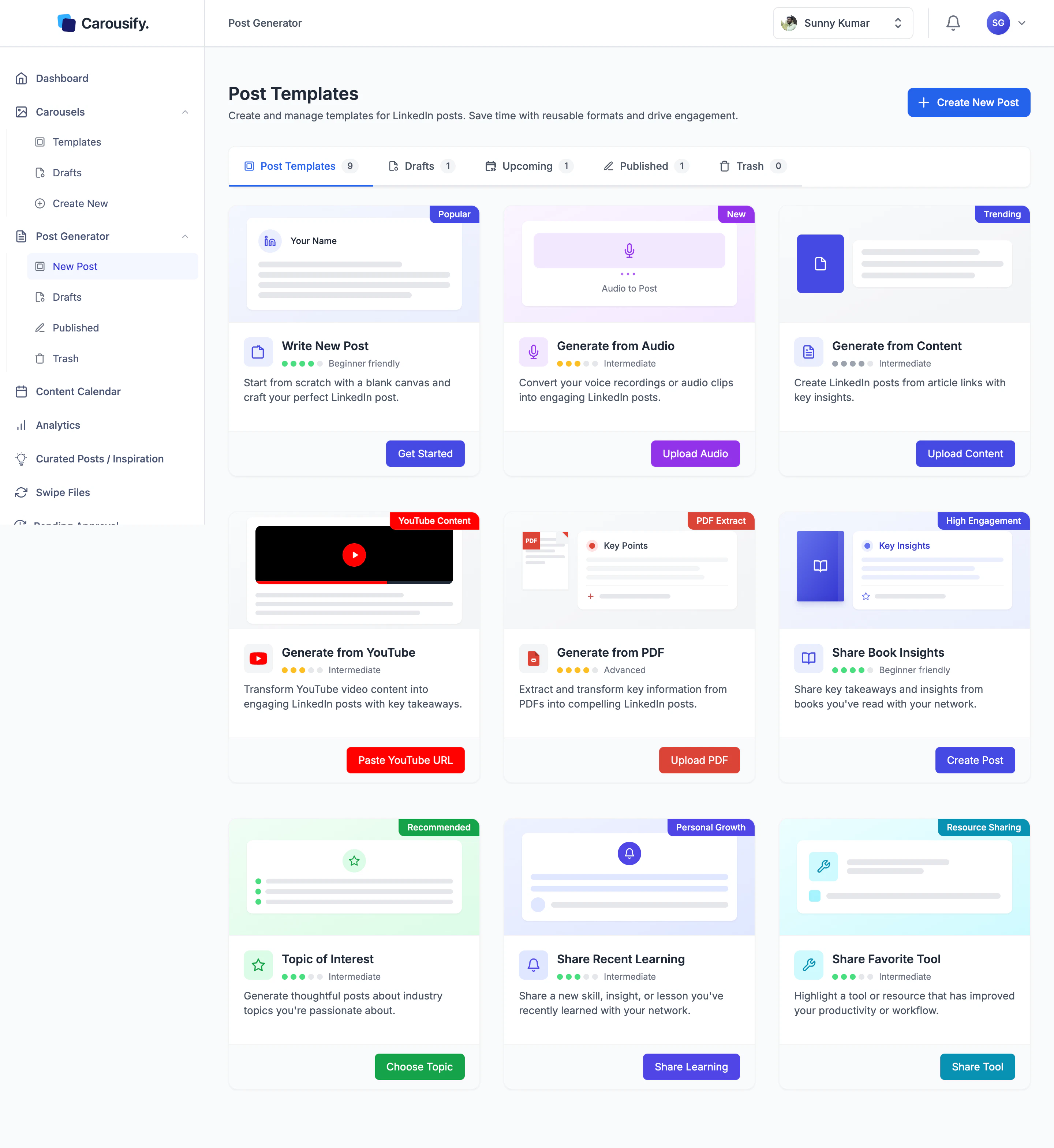
Open it once and you get nine starting points: a blank canvas, four AI generators that turn audio, articles, YouTube videos, or PDFs into a draft, and four guided prompts for common post shapes. They all share the same writer at the end — but each one runs a different input flow and AI prompt before it gets there.
 ## Where to find it
In the left sidebar, open the **Post Generator** group.
| Page | What it is |
| ------------- | --------------------------------------------------------------------- |
| **New Post** | The templates gallery — your nine starting points. |
| **Drafts** | Posts you've saved but not yet scheduled or published. |
| **Published** | Everything already live on LinkedIn, plus posts scheduled to go live. |
| **Trash** | Deleted drafts and posts. Restore from here or empty for good. |
The five tabs at the top of the gallery — **Post Templates / Drafts / Upcoming / Published / Trash** — surface the same lists with live counts.
## Nine ways to start
Blank canvas. Type the post yourself with formatting and a live LinkedIn preview.
Paste an article URL and AI drafts a post from the piece.
Upload a voice note. Carousify transcribes it and turns it into a post.
Paste a YouTube link. AI reads the video description and drafts a post off it.
Upload a research paper, ebook, or report — get a post built from the highlights.
Quick prompt for sharing takeaways from a book you've read.
Pick an industry topic and get a thoughtful post drafted around it.
Turn a new skill, lesson, or insight into a personal-growth post.
Highlight a tool or resource that's improved your workflow.
Every starting point ends in the same writer, but each runs its own input step and AI prompt to get there — *Generate from PDF* is not the same prompt as *Generate from YouTube*. Once the draft is in the editor, you can edit anything AI produced line by line before publishing.
## What's next
Walk through the editor — formatting, slash-command AI, and the live LinkedIn preview.
Audio, articles, YouTube, and PDF generators in one walkthrough.
Auto-generated post ideas refreshed on the days you choose.
Bold, italic, lists, and how the LinkedIn preview renders each.
Queue your finished post at a peak time for your timezone.
## Where to find it
In the left sidebar, open the **Post Generator** group.
| Page | What it is |
| ------------- | --------------------------------------------------------------------- |
| **New Post** | The templates gallery — your nine starting points. |
| **Drafts** | Posts you've saved but not yet scheduled or published. |
| **Published** | Everything already live on LinkedIn, plus posts scheduled to go live. |
| **Trash** | Deleted drafts and posts. Restore from here or empty for good. |
The five tabs at the top of the gallery — **Post Templates / Drafts / Upcoming / Published / Trash** — surface the same lists with live counts.
## Nine ways to start
Blank canvas. Type the post yourself with formatting and a live LinkedIn preview.
Paste an article URL and AI drafts a post from the piece.
Upload a voice note. Carousify transcribes it and turns it into a post.
Paste a YouTube link. AI reads the video description and drafts a post off it.
Upload a research paper, ebook, or report — get a post built from the highlights.
Quick prompt for sharing takeaways from a book you've read.
Pick an industry topic and get a thoughtful post drafted around it.
Turn a new skill, lesson, or insight into a personal-growth post.
Highlight a tool or resource that's improved your workflow.
Every starting point ends in the same writer, but each runs its own input step and AI prompt to get there — *Generate from PDF* is not the same prompt as *Generate from YouTube*. Once the draft is in the editor, you can edit anything AI produced line by line before publishing.
## What's next
Walk through the editor — formatting, slash-command AI, and the live LinkedIn preview.
Audio, articles, YouTube, and PDF generators in one walkthrough.
Auto-generated post ideas refreshed on the days you choose.
Bold, italic, lists, and how the LinkedIn preview renders each.
Queue your finished post at a peak time for your timezone.