> ## Documentation Index
> Fetch the complete documentation index at: https://docs.carousify.com/llms.txt
> Use this file to discover all available pages before exploring further.
# Upgrade or downgrade
> Change your Carousify plan or billing cycle, and what happens to your data.
You can upgrade your plan or switch billing cycle yourself from the **Billing & Subscription** page. Downgrades go through support so the team can move your data and limits cleanly.
## Upgrade your plan
Go to **Account menu › Billing**.
The **Choose Your Plan** modal opens.
Toggle **Monthly** or **Yearly** at the top.
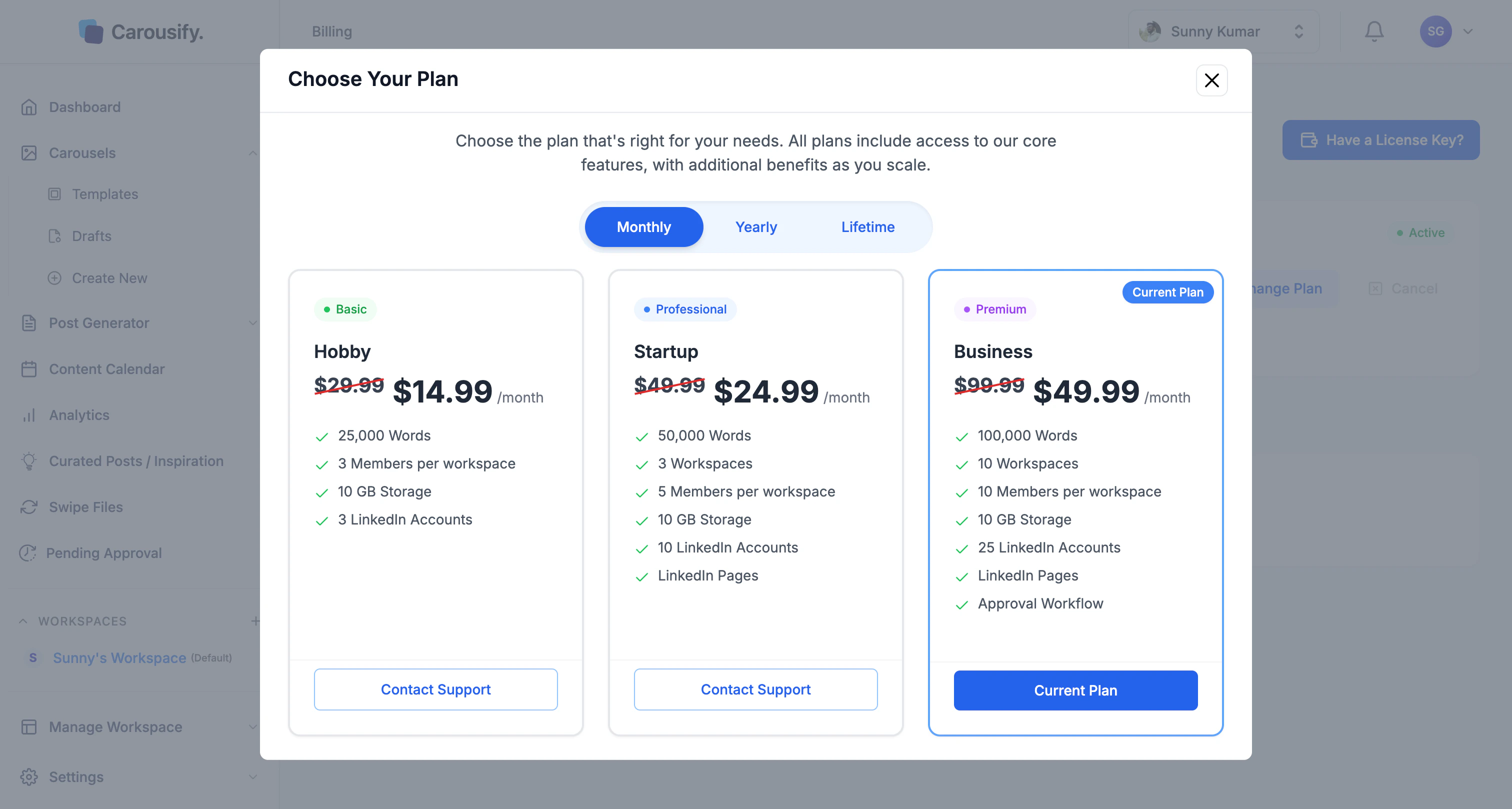 Click **Select Plan** on the tier you want. Your current plan is marked with a **Current Plan** badge — you can't re-select it.
Carousify routes you to checkout. Upgrades take effect immediately and prorate against your existing balance, so you only pay the difference for the rest of the cycle.
## Switch billing cycle
To move from monthly to yearly (or back), follow the same flow above and toggle the cycle on the **Choose Your Plan** screen before selecting your tier. Switching to yearly mid-cycle prorates the remaining monthly time against the new annual charge.
## Downgrade your plan
To move to a lower tier, [contact support](https://carousify.com/contact-us/) and tell us which plan you want. We'll handle the switch.
Downgrades take effect at the **start of your next billing cycle**, not immediately. Your current paid cycle runs out at the higher tier first.
## What happens to your data
When you upgrade, everything stays — your new limits just kick in. Downgrades are where you need to be careful, since the lower tier may not have room for everything you've built.
* **Carousels, drafts, scheduled posts, brand kits, and templates** in workspaces that fit the new plan are preserved.
* **Workspaces above the new limit will be lost** when the downgrade applies. If your current plan allows 10 workspaces and you're moving to one that allows 3, the 7 extras — along with everything inside them (carousels, drafts, scheduled posts, brand kits, members) — are removed at the start of the next cycle.
* **Connected LinkedIn accounts** above the new account limit are disconnected automatically.
* **Team members** above the new per-workspace cap lose access to that workspace.
* **AI word balance** resets each cycle, so the new monthly allowance applies from your next renewal.
Before requesting a downgrade, manually delete or archive the workspaces, accounts, and members you don't need so nothing important is removed for you. Export anything you want to keep.
Click **Select Plan** on the tier you want. Your current plan is marked with a **Current Plan** badge — you can't re-select it.
Carousify routes you to checkout. Upgrades take effect immediately and prorate against your existing balance, so you only pay the difference for the rest of the cycle.
## Switch billing cycle
To move from monthly to yearly (or back), follow the same flow above and toggle the cycle on the **Choose Your Plan** screen before selecting your tier. Switching to yearly mid-cycle prorates the remaining monthly time against the new annual charge.
## Downgrade your plan
To move to a lower tier, [contact support](https://carousify.com/contact-us/) and tell us which plan you want. We'll handle the switch.
Downgrades take effect at the **start of your next billing cycle**, not immediately. Your current paid cycle runs out at the higher tier first.
## What happens to your data
When you upgrade, everything stays — your new limits just kick in. Downgrades are where you need to be careful, since the lower tier may not have room for everything you've built.
* **Carousels, drafts, scheduled posts, brand kits, and templates** in workspaces that fit the new plan are preserved.
* **Workspaces above the new limit will be lost** when the downgrade applies. If your current plan allows 10 workspaces and you're moving to one that allows 3, the 7 extras — along with everything inside them (carousels, drafts, scheduled posts, brand kits, members) — are removed at the start of the next cycle.
* **Connected LinkedIn accounts** above the new account limit are disconnected automatically.
* **Team members** above the new per-workspace cap lose access to that workspace.
* **AI word balance** resets each cycle, so the new monthly allowance applies from your next renewal.
Before requesting a downgrade, manually delete or archive the workspaces, accounts, and members you don't need so nothing important is removed for you. Export anything you want to keep.